Definitely Not Bomberman
Keywords
Background Context
In order to gain a bit more experience working with the Godot Game Engine after using it for 1 year, I challenged myself to do a game jam with a friend. The original constraint was to work on it for 2 days but I ended up enjoying the process of building the game up that I spent approximately 2 months to add extra polish and refinement to the game.
My Contributions to the Game:
- sketch up rough UI mockouts of the game HUD, start menu, and pause menu using Excalidraw
- translate rough UI mockouts into interactable UIs in the Godot Game Engine
- design and implement 4 different bomb explosion effects using object oriented programming principles and inheritance
- programming enemy AI attack patterns using Finite State Machines (FSMs) and AI Steering Behaviors to prevent enemies from clumping together too closely
- create an algorithm that randomizes enemy spawn positions which ensures they are spread apart and don’t overlap with one another or other spawnable objects in game
- publish the game on itch.io
Play the Game Here
Tech Stack I used
- Godot 4
- Krita to sketch out some of the VFX such as bomb explosions or player death animation visual effects
Approximate Completion Time
- 2 days to get rough game jam idea built out. Below is a screenshot of what the game looked like after 2 days of prototyping the bomb throw game mechanic, explosion, enemy AI, and enemy hurt and defeat shader effects:
- 2 months to add further artistic polish. This includes UI wireframing to implementing the UI into godot, adding music, ensuring game has multiplatform support (e.g. works on web and windows):
What challenges did I run into?
A humbling moment about AI State Management using FSMs
A bug that would occur sometimes but not all the time is that an enemy would re-appear briefly then disappear when defeated. The problem became more apparent when many bombs at once were thrown at the enemy as it died.
# dashing_enemy.gd
func on_dash_attack_connected(other: Node2D):
  # because I'm not checking what kind of node I'm hitting,
  # it turns out this function gets called when it also overlaps with the bomb game object;
  # therefore, it causes the enemy to re-appear as it is changing its AI state to FOLLOW....
  event_bus.on_start_attack.emit(self, other)
  complete_dash()
Since other objects rather than the player can overlap or collide with the enemy such as the player bomb, the on_dash_attack_connected function would get triggered whenever the enemy’s attack_area collider would get triggered via the body_entered signal.
I fixed the bug by checking to see if the other node being overlapped with is not then Player and exiting out of the function early to avoid further processing.
func on_dash_attack_connected(other: Node2D):
  if other is not Player:
    return

  event_bus.on_start_attack.emit(self, other)
  complete_dash()
Ensuring Random Enemy Spawn Positions are unique enough
The problem I was solving here was: “How do I create a system where enemies can spawn on tiles set in the level while ensuring they don’t spawn on top of each other or any other interactable objects in the game?”
The way I solved it was treating each tile as a spot that can either be available to spawn an object onto or a spot where you cannot spawn an object onto. By using the 2D array of bools data structure, I was able to achieve the picking unique random spawn positions for enemies to go in below:
# random_spawn_picker.gd

# represents what positions are valid to spawn packed scenes in
# 2d array of bools
# true - can spawn a packed scene in the given [y][x] tile coordinate position
# false - cannot spawn a packed scene in the given [y][x] tile coordinate position
var available_positions: Array[Array]

func pick_random_spawn_location(excluded_tile_positions_set: Dictionary[Vector2i, bool]) -> Vector2i:
  # collect all randomly available positions
  var valid_positions: Array[Vector2i] = []

  for y in range(tile_map_height):
    for x in range(tile_map_width):
      var possible_position = Vector2i(x, y)
      var is_available: bool = available_positions[y][x]
      if is_available and (possible_position + tile_root_position) not in excluded_tile_positions_set:
        valid_positions.append(possible_position)

  var random_index: int = -1 if len(valid_positions) == 0 else randi_range(0, len(valid_positions) - 1)
  if random_index == -1:
    return INVALID_POSITION

  var random_position: Vector2i = valid_positions[random_index]
  # mark is unavailable position to spawn in
  available_positions[random_position.y][random_position.x] = false

  # add to tile_root_position to ensure the tiles are placed at the correct offset
  return random_position + tile_root_position
With this function, it allowed me to:
- Add tile positions to exclude to be picked in the randomization. A use case for this is to exclude bomb pickups that would also spawn randomly in a room.
- Guarantee unique spawn positions are always picked as the algorithm would check if a row;column combination is available and add it to a list of valid positions to pick from.
- In the event that no spots are available to be picked for spawning, I return an
INVALID_POSITIONvector2i which I use as a signal to indicate that something went wrong and can be used as an aid to further troubleshoot potential issues that may arise in the future.
If you’re interested in how I implemented this feature fully, check out the code link here
Enemy getting stuck in the Death State for a few frames
One of the issues I got stuck on was that the player death animation sequence kept on getting played over and over again.
The root cause of the issue is how deletion works in Godot. To delete a game object in Godot, you use the queue_free() function which schedules the current game object node to be deleted at the end of the frame. Because there are enemy projectiles that can attack the player while player is being queued for deletion, I ended up running into a race condition where the player would repeat the same death animation sequence over and over again. To fix it, I wrote the following code in _on_projectile_hit(projectile: Projectile, target: Node2D) in the Player.gd script to exit out of the function early to avoid damaging an already dead player:
func _on_projectile_hit(projectile: Projectile, target: Node2D):
  # if not the same target, skip
  if self != target or target is not Player:
    return

  if is_hurt:
    return

  # THE FIX:
  # if already dead, don't re-trigger the death animation
  if !self.is_alive or self.is_dead or self.is_queued_for_deletion():
    return

  # logic that applies damage to player here removed
  # to keep example short and concise
self.is_queued_for_deletion() is a function in godot to check if a node or game object is already been marked for deletion. It returns true if it will be deleted at the end of frame; false otherwise.
Keeping enemies not too close to each other
The problem I was trying to solve was: how to keep enemies from grouping together too closely?
After some research, I found an article about AI Steering Behaviors by Craig Reynolds which explains different kinds of steering behaviors that I can use for my project. A video explanation by The Coding Train was something I started with to help solidify my understanding. I used the Separation steering behavior for the enemy AI to ensure they are not sticking next to each other.
The code in gdscript looks something like this:
func separate_steering_behavior(enemies: Array[BaseEnemy]) -> Vector2:
	var desired_velocity: Vector2 = Vector2.ZERO
	var average_count: int = 0

	for enemy in enemies:
		var diff: Vector2 = self.position - enemy.position
		var dist: float = diff.length()
		if dist > 0:
			diff.normalized()
			desired_velocity += diff
			average_count += 1

	if average_count > 0:
		desired_velocity = desired_velocity / average_count

	return desired_velocity
The main idea behind the Steering Behaviors is to treat each behavior as a function and use vector math to add up all the velocities together to create a new velocity which ultimately describes how my enemies in my game move. How its used in code looks like this:
var enemies: Array[BaseEnemy] = self.find_all_nearby_enemies()
var separation_force: Vector2 = self.separate_steering_behavior(enemies)

# do a vector subtraction operation here because we want to
# obtain the difference between the enemy's current velocity and resulting separation force
var steer: Vector2 = separation_force - self.velocity

# limit the scalar magnitude of the steer to 100 to ensure other velocity calculations
# such as moving towards the player doesn't get completely removed by this steering behavior
steer = steer.limit_length(100.0)

# add the steering velocity to the current velocity
self.velocity += steer
This is how the vector math for the steering subtraction looks like visually:
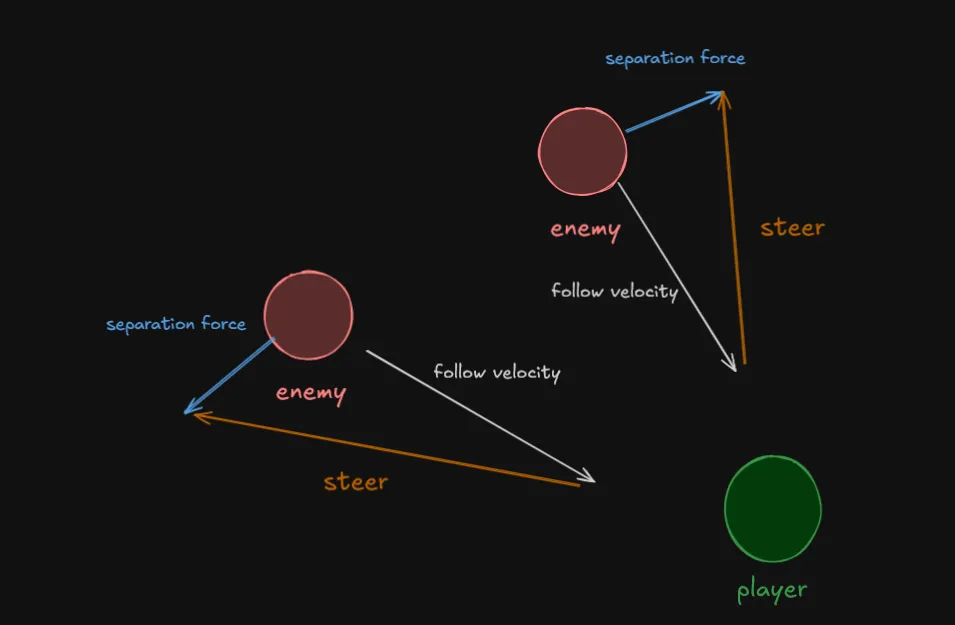
For example, there are 2 enemies that are following the player and one of the enemies separation force is the average difference of the 2 enemies. The average difference or separation force is subtracted by the follow velocity to obtain the steer velocity. Lastly, the steer velocity is added back to the follow velocity to get what you see below:
- There may be other instances where the enemies clump together such as adding 20 or more enemies in the room in the GIF above. For the purposes of how I designed and setup the rooms, the use case of the separation steering behavior works well here!
What did I learn?
Programming Improvements
- Instead of finding all nearby enemies for each enemy in order to prevent one another from getting too close each frame, I could implement a spatial partitioning algorithm to help with performance. I decided not to do it for this project as there is only about 2-6 enemies that spawn per wave. However, if there will be a lot of enemies or projectiles on screen like in a rogue like or bullet heaven genre, it would be one of the approaches I would consider at that scale.
Learning Outcomes
- learned how to draw vfx for bomb explosions and other misc effects in game
- learned how to wireframe UI mockups and translate them into functional game UIs
- learned how to use in game camera and design it in a way where it would redirect the player’s attention to specific areas such as when the room becomes either locked or unlocked
- applied vector math fundamentals involving the gravity bomb explosion and applying player knockback logic